In the world of electrical engineering, design, and even ambitious DIY projects, a diagram isn't just a drawing—it's the blueprint, the instruction manual, the troubleshooting guide, and the legal documentation all rolled into one. Choosing the right tools and software for electrical diagramming isn't merely a preference; it's a critical decision that impacts accuracy, efficiency, collaboration, and ultimately, the success of your project.
Imagine trying to build a complex machine without a clear schematic, or trying to debug an intricate circuit blindfolded. That’s the challenge electrical professionals face without specialized software. These aren't just drawing apps; they are indispensable powerhouses that translate complex ideas into clear, standardized visuals, ensuring that every wire, component, and connection is meticulously defined.
At a Glance: Key Takeaways for Choosing Your Electrical Diagramming Software
- Categorize Your Needs: Understand if you need comprehensive Electronic Design Automation (EDA), versatile general-purpose diagramming, or precision Professional CAD tools.
- Balance Cost and Features: Free and open-source options are excellent for beginners and smaller projects, while commercial suites offer advanced functionality for complex, professional work.
- Prioritize Intuitive Interfaces: A steep learning curve can cripple productivity. Look for tools with extensive tutorials, active communities, and modern, customizable UIs.
- Consider Collaboration & Integration: For team-based projects, cloud-based tools with real-time collaboration and integration with simulation/manufacturing are crucial.
- Scalability Matters: Choose a tool that can grow with your projects, from simple schematics to multi-layer PCBs, without forcing a complete overhaul of your workflow.
Why Your Electrical Diagrams Matter (More Than You Think)
Electrical diagrams, often called schematics, are the universal language of electrical and electronic systems. They depict components and connections using standardized electrical symbols, allowing engineers, technicians, educators, and hobbyists to accurately document, design, and simulate circuits. Without these tools, communicating complex electrical concepts would be chaotic, error-prone, and incredibly time-consuming.
Specialized schematic drawing software provides not just a canvas, but a smart environment:
- Standardized Symbol Libraries: Ensuring consistency and clarity across all designs, regardless of who's reading them.
- Design Rule Validations: Automatically checking for common errors, saving hours of manual review and preventing costly mistakes down the line.
- Simulation Capabilities: Allowing you to test your circuit's behavior virtually before ever soldering a component, verifying reliability and performance.
- Time and Cost Savings: Streamlining the design process, reducing iterations, and ensuring designs conform to industry standards from the outset.
These benefits make the software indispensable, transforming abstract ideas into tangible, verifiable plans.
Decoding the Landscape: Understanding Your Options
The world of electrical diagramming software isn't one-size-fits-all. It broadly breaks down into three distinct categories, each tailored for different scopes and user needs.
The Big Three Categories
- Electronic Design Automation (EDA) Tools:
These are the heavyweights for comprehensive electronic design. EDAs aren't just for drawing; they manage the entire electronic product development lifecycle. You'll use them for schematic capture, designing Printed Circuit Board (PCB) layouts, simulating circuit behavior, and generating manufacturing data. They're built for precision and complex projects.
- Examples: KiCad, EasyEDA, Fritzing.
- General-Purpose Diagramming Tools:
Think of these as your versatile digital whiteboards. While not exclusively for electronics, they're incredibly useful for block diagrams, flowcharts, network diagrams, and even simplified circuit visuals. They excel in user-friendliness, offering drag-and-drop interfaces, extensive shape libraries (often including basic electrical symbols), and strong collaboration features. They're great for illustrating concepts or less intricate designs.
- Examples: Draw.io (diagrams.net), Lucidchart.
- Professional CAD Tools:
These are the industry standards, typically found in large engineering firms and demanding professional environments. Computer-Aided Design (CAD) systems provide full-featured, advanced schematic and technical drawing functionalities. They offer unmatched precision, detailed technical documentation, extensive customization, and deep integration options with other engineering software. However, this power comes with a significant learning curve and a substantial price tag.
- Examples: AutoCAD Electrical, SolidWorks Electrical.
The Unseen Hurdles: Common Pain Points in Software Selection
Choosing the right software can feel like navigating a minefield. Many users encounter similar frustrations:
- The Steep Learning Curve: Powerful software often comes with complex interfaces and a multitude of features, demanding significant time investment to master.
- Balancing Cost Versus Functionality: Free tools might lack advanced features you need, while professional software can be prohibitively expensive for individuals or small businesses.
- Poorly Designed User Interfaces: An unintuitive or outdated interface can slow down your workflow, increase frustration, and lead to errors.
To overcome these, prioritize tools that offer intuitive learning processes, backed by extensive tutorials, vibrant community forums, and comprehensive documentation. A modern, customizable interface can also make a world of difference in your daily productivity. Remember, free options are perfect for small or educational projects, but don't shy away from robust commercial tools if your professional endeavors demand them.
Navigating the Sea of Choices: Top Tools for Every Need
Let's dive into some of the most popular and effective tools available today, breaking down their strengths and weaknesses.
Free & Open-Source Heroes (and Freemium Favorites)
These tools offer powerful capabilities without the hefty price tag, making them ideal for students, hobbyists, startups, and anyone on a budget.
KiCad: The Open-Source Powerhouse
KiCad is a free, open-source EDA suite that covers the entire journey from schematic capture to PCB layout. It's a darling in the open-source community, boasting extensive component libraries, 3D visualization, and robust design rule checking.
- Pros: Cross-platform (Windows, macOS, Linux), extremely active community for support, capable of handling complex multi-layer designs. It’s a true professional-grade tool that doesn't cost a dime.
- Cons: The learning curve can be steep, especially for beginners. Its built-in simulation capabilities are limited compared to dedicated simulators, and some find its UI less modern than commercial alternatives.
Draw.io (diagrams.net): The Ultimate General-Purpose Canvas
Often referred to by its online domain, diagrams.net, Draw.io is a completely free, browser-based, and desktop diagramming tool. While not specifically an EDA, it's fantastic for basic schematics, block diagrams, flowcharts, and network diagrams. It integrates seamlessly with cloud storage services (Google Drive, OneDrive, Dropbox) and supports real-time collaboration.
- Pros: Incredibly user-friendly with a drag-and-drop interface, cross-platform, and genuinely 100% free with no hidden costs or features behind a paywall. Great for quick visuals and collaborative brainstorming.
- Cons: Lacks advanced technical features like integrated simulation, design rule checking specific to electrical engineering, or direct PCB layout capabilities.
EasyEDA: Cloud-Based Circuit Design
EasyEDA is a robust, cloud-based platform for schematic capture, circuit simulation (powered by SPICE), and PCB design. Its browser-centric nature means you can access your projects from anywhere without installation. It also boasts direct integration with component suppliers like JLCPCB and LCSC.
- Pros: No installation required, real-time collaboration features make it great for teams, and it offers a cost-effective path to professional-grade design. The integrated SPICE simulation is a huge plus.
- Cons: Requires an internet connection to function (though there's an offline client that syncs), the free version has limitations on private projects and features, and mandatory registration is a small hurdle.
Fritzing: For the Arduino Enthusiast
Fritzing is an educational tool specifically designed for beginners, hobbyists, and those working with microcontrollers like Arduino. It offers unique breadboard, schematic, and PCB views, making the transition from physical prototyping to diagramming incredibly intuitive. It has a community-contributed parts library with many Arduino-specific components.
- Pros: Incredibly easy for beginners to pick up, ideal for educational purposes and documenting simple prototypes.
- Cons: Limited professional features, a slower update cycle compared to larger projects, and generally inadequate for complex simulations or high-density PCB designs.
LTspice: The Simulation Specialist
LTspice, from Analog Devices, is a high-performance SPICE-based circuit simulator with integrated schematic capture. While its primary strength lies in simulating analog and mixed-signal circuits, its schematic capture tool is perfectly functional for setting up those simulations.
- Pros: It's completely free and exceptionally powerful for circuit simulation, boasting an extensive library of analog models. If you need to deeply understand circuit behavior, this is your tool.
- Cons: Has a notoriously steep learning curve, its interface feels dated, and it's heavily simulation-focused, meaning it's less suited for pure documentation or PCB layout.
Lucidchart: Professional Diagramming, Free Tier Included
Lucidchart is a professional, web-based diagramming solution renowned for its intuitive drag-and-drop interface, extensive templates, and robust real-time collaboration features. While not exclusively an electrical engineering tool, its vast shape libraries include electrical and electronics symbols, making it suitable for professional-looking basic schematics and system diagrams.
- Pros: Extremely beginner-friendly with a polished UI, excellent for team collaboration and creating professional visuals quickly.
- Cons: The free tier is quite limited in terms of document count and advanced features. It's not specifically designed for deep electronic design, so it lacks EDA-specific functions like design rule checking or direct PCB integration. Potential cost escalation if you need more features.
Other Notable Free/Open-Source Mentions:
- QElectroTech: A free, open-source application purpose-built for detailed electrical schematics, boasting a rich library of standardized standardized electrical symbols. It's cross-platform but can have a complex interface for non-electrical diagrams.
- Dia: A simple, free, open-source diagramming tool for basic schematics, flowcharts, and network diagrams. Lightweight and quick for simple creations, but lacks advanced features and collaboration.
- TinyCAD: A lightweight, free, open-source schematic capture program for Windows. It offers a symbol library editor and netlist generation, making it fast and easy to master for simple designs, but its functionality is limited and the UI is dated.
Professional Powerhouses (with Trials & Education Options)
When your projects demand industry-grade precision, extensive libraries, and seamless integration with manufacturing workflows, these commercial tools are often the go-to. Many offer free trials or educational licenses to ease the barrier to entry.
AutoCAD Electrical: The Industry Standard for Electrical CAD
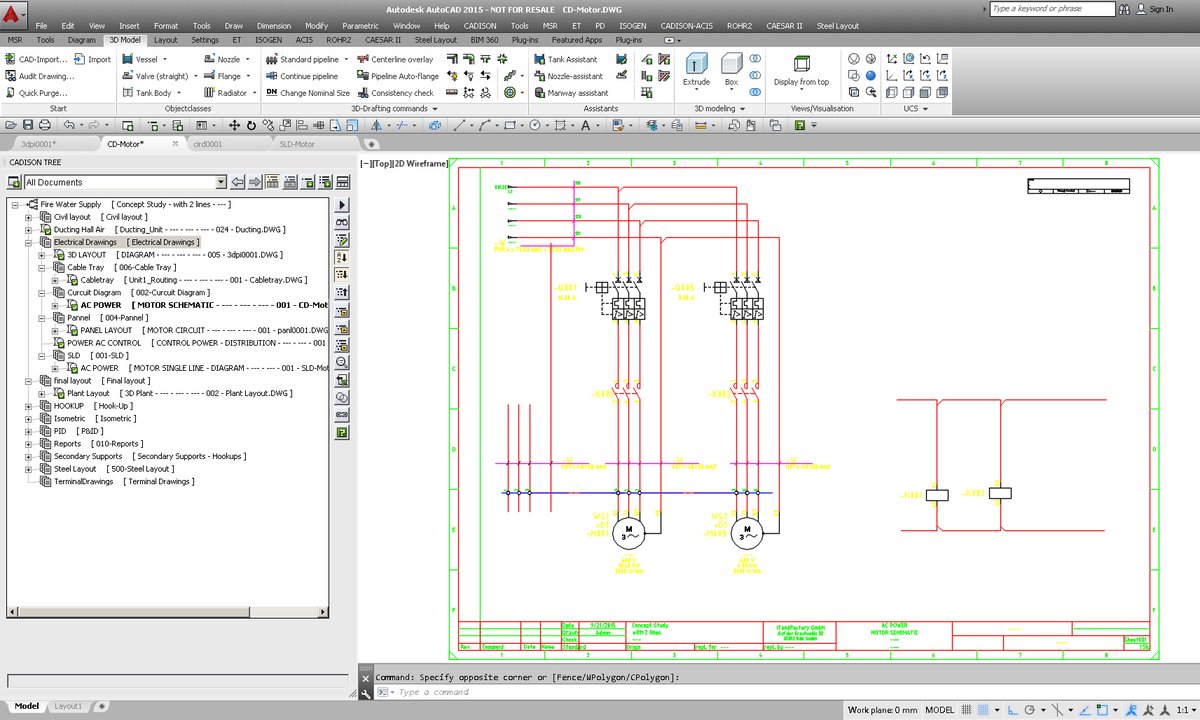
Part of the Autodesk ecosystem, AutoCAD Electrical is a specialized version of the ubiquitous AutoCAD platform, specifically tailored for electrical schematic design. It provides automated drawing tools, comprehensive component libraries, and robust compliance tracking.
- Pros: Highly trusted and established in professional settings, offering industry-grade precision and reliability. Features like automatic wire numbering, component tagging, and report generation significantly boost productivity.
- Cons: Significantly expensive, especially for individual users. It also carries a substantial learning curve, even for existing AutoCAD users, and free options beyond educational licenses are virtually non-existent.
SolidWorks Electrical: Collaborative 3D Electrical Design
SolidWorks Electrical Schematics is a professional, collaborative design tool for developing complete electrical systems within a 3D mechanical design environment. It offers an extensive symbol library, 3D manufacturing parts, and component models, allowing for a truly integrated design approach.
- Pros: Excellent for seamless integration between electrical and mechanical design teams, facilitating early conflict detection. Its comprehensive libraries and collaborative features are top-tier.
- Cons: Custom pricing can be very high. There is no free version, though free trials are often available. It requires a significant learning investment to leverage its full capabilities.
EdrawMax: The All-in-One Diagramming Solution
EdrawMax is a versatile, all-in-one diagramming solution with a massive collection of templates and symbols covering almost every diagram type imaginable, including detailed circuit and electrical diagrams. It’s designed to be user-friendly across all major operating systems and browsers.
- Pros: Highly flexible and supports a vast array of diagram types. It produces professional-quality visuals and receives regular updates. Its extensive template library can jumpstart many projects.
- Cons: The free version typically applies watermarks to exports, pushing users towards a subscription. Full functionality requires a paid plan, and while flexible, mastering its advanced features for specific electrical tasks can still present a learning curve.
Microsoft Visio: The Ubiquitous Diagrammer
Microsoft Visio is an industry-standard diagramming tool known for its extensive templates, rich shape libraries, and deep integration with Microsoft 365. While it's a general-purpose diagrammer, its electrical engineering stencils make it a viable option for creating professional-looking schematics and wiring diagrams.
- Pros: Widely recognized and trusted in business environments. Offers robust design capabilities and is familiar to many users of Microsoft products.
- Cons: The web version has limited features compared to the desktop application. Like other professional tools, it has a learning curve, especially for advanced customization, and comes with a significant subscription cost.
Other Professional Mentions:
- ETAP (Electrical Power System Analysis Software): A specialized tool focused on electrical diagrams for power systems, offering automation, optimization, simulation, and analysis tools with CAD capabilities. It's Windows-only and has custom pricing, best suited for large-scale power system projects.
- Electra E8: Known for its ease, speed, and affordability in creating electrical, pneumatic, and hydraulic diagrams. It's a desktop CAD tool offering a free trial but no online version.
- ProfiCAD: Designed specifically for electrical diagrams, circuit boards, pneumatics, and hydraulics. It aims to be easy to use for beginners and students, offering a perpetual license model.
- SmartDraw: A multipurpose diagramming tool that also excels at engineering drawings, including electrical diagrams, with over 4500 templates and CAD-like abilities. It's not free and requires registration for its trial.
Your Decision Matrix: How to Choose the Right Tool
With so many options, how do you zero in on the perfect fit? It comes down to a clear understanding of your specific needs.
Asking the Right Questions
Before committing, consider these critical aspects of your work:
- Project Complexity: Are you drafting a simple block diagram for a home automation project, or designing a multi-layer PCB for a commercial product? Simple projects might only need a general diagramming tool, while complex ones demand an EDA suite.
- Technical Domain: Are you focused purely on electronics (EDA tools), heavy-current electrical installations (AutoCAD Electrical, ETAP), or general system diagrams (Visio, Lucidchart)? The tool's specialization matters.
- Integration Needs: Do you need to seamlessly integrate your schematic with circuit simulation (LTspice, EasyEDA), PCB layout (KiCad, EasyEDA), mechanical CAD (SolidWorks Electrical), or manufacturing data generation?
- Team Environment & Collaboration: Are you working solo, or do you need real-time collaboration with team members across different locations? Cloud-based tools like EasyEDA, Draw.io, or Lucidchart excel here.
- Budget Constraints: What are you realistically willing or able to spend? Free options are excellent starting points, but professional tools often justify their cost through increased productivity and advanced features.
Prioritizing Features: What Really Matters?
Different users weigh features differently. What's "critical" for an enterprise might be "low" priority for a hobbyist.
- Component Libraries: For any serious electrical work, extensive and accurate component libraries are critical. They save immense time and ensure you're using the correct electrical symbols and part data.
- Real-Time Collaboration: Essential for teams. Cloud-based solutions often lead the way here.
- Standards Compliance: Absolutely critical for professional and enterprise projects, ensuring designs meet industry standards and regulations.
- Cost: A major factor for hobbyists and students, becoming less critical as project scale and budget grow.
- Integration: How well the software plays with other tools (simulators, mechanical CAD, manufacturing software) can define efficiency.
| Feature Category | Hobbyist/Student | Small Business | Enterprise |
| :---------------------- | :--------------- | :------------- | :--------- |
| Component Libraries | Important | Critical | Critical |
| Real-Time Collaboration | Low | Moderate | Critical |
| Standards Compliance | Low | Important | Critical |
| Cost | Critical | Important | Moderate |
| Integration | Low | Important | Critical |
Practical Pointers for Getting Started
You've got the knowledge, now for the action.
- Start with Free Options: Tools like KiCad or Draw.io are fantastic entry points. They allow you to gauge your workflow, experiment with different approaches, and understand what features you genuinely need without financial commitment. This initial exploration can save you from investing in an unsuitable commercial solution.
- Consider Scalability: Think ahead. Even if your current project is simple, will your future endeavors become more complex? Choosing a tool that can scale with you (or one that has a clear upgrade path) prevents the headache of migrating designs later.
- Review Community and Support: A vibrant online community (forums, tutorials, YouTube channels) can be a lifeline for learning and troubleshooting. For paid software, evaluate the vendor's technical support options. An active community or responsive support team can dramatically flatten the learning curve.
- Evaluate Integration Abilities: If your workflow involves simulation, PCB fabrication, or mechanical design, check how well your chosen schematic software integrates with these other platforms. Seamless data exchange is a massive productivity booster.
Looking Ahead: The Future of Electrical Diagramming
The landscape of electrical diagramming is constantly evolving, driven by advancements in cloud computing, artificial intelligence, and user experience design. Here’s what you can expect:
- Increased Focus on Cloud-Based Solutions: Expect even more seamless access and collaboration features, making geographical boundaries irrelevant for design teams.
- AI-Assisted Design: Artificial intelligence will increasingly play a role in optimizing designs, suggesting component placements, and even proactively identifying potential errors before they become issues. This will accelerate design cycles and improve reliability.
- Improved Intuitive User Interfaces: Software developers are continually refining UIs to be more user-friendly and less intimidating, making powerful tools accessible to a broader audience.
- Enhanced Real-Time Collaboration: Features like multi-user editing, advanced version control, and integrated communication tools will become standard, mimicking the collaborative experience of modern document editors.
These trends promise to make electrical diagramming even more efficient, intelligent, and accessible for everyone from the seasoned engineer to the curious hobbyist.
Your Next Step: Drawing Your Path Forward
The best tools and software for electrical diagramming are those that fit your unique needs, budget, and project complexity. Don't be afraid to experiment with free trials and open-source options. Start small, understand your workflow, and then make an informed decision that empowers you to bring your electrical visions to life. Whether you're planning a sophisticated power grid or a simple LED circuit with standard electrical symbols, the right software is your most valuable ally.